Progress tracking is key to the “monitoring” in the Monitoring and Control phase. Progress Tracking is the process of collecting project updates from team members and recording them in the work plan. For the information to be useful, it needs to be accurate, consistent and regularly collected. People often refer to tracking as collecting actuals.
In order to manage project execution, you need to track its progress. This article shows how.
What Is the Value of Progress Tracking?
A key role of project managers is identifying early signs of trouble in projects so they can adjust accordingly.
Tracking progress provides the project manager with the first opportunity to validate the estimated work effort for the planned tasks. Validating work is critical because costs are tied to the amount of work completed, not the time spent doing the work.

As a result of tracking, the project manager can continue holding the team accountable for the quantity and quality of the project work performed. Teams provide more accurate estimates and are more committed to achieving them when they know their progress will be measured against estimates.
The Hawthorne Time and Motion Studies
The impact of progress tracking has been demonstrated in lab settings.
The Hawthorne Time and Motion Studies were initially conducted to test the impact that different work environments had on productivity. Researchers changed the environment to make it bright, cheery, and comfortable and found workers were productive under these conditions. This matched the researchers’ expectations, but workers remained productive even when the environment was made dark, dreary, and uncomfortable.
This led to an unexpected conclusion: the increased productivity wasn’t due to the environment; it was the fact that they were being observed in the first place. The resulting theory was simple: people work harder when they know someone is watching. This idea is sometimes referred to as “Theory X.”
This tends to have a negative connotation, but it does not have to. In reality, people do what they believe is valued and important. If no one else cares about a plan, schedule, or task accomplishment, why should the worker care?
And so, tracking does not have to be intrusive or demotivating. It can be a way of saying “What you are doing is important and matters to me and the organization.”
How to Effectively Track Project Progress
While emerging technologies make real-time progress tracking more possible than ever before, there may remain practical and cultural limitations to tracking everything everywhere all at once.

When most people say what they do for a living, they define their job by the tasks they complete and the role they serve on a team. The effort that goes into estimating that work and reporting on it is seen as a hassle that gets in the way of their “real job.” And, as discussed with regards to the Hawthorne Studies, people will often be concerned about the motivation behind tracking actuals.
Finally, an organization’s culture and matrix structure might limit a project manager’s direct control over how teams monitor their projects. A true project leader will be sensitive to these concerns and determine the most realistic process to implement for their projects.
To start tracking project progress, first decide how much to track, then what to track, and finally, how to track it.
The Seven Levels of Tracking Model
The Seven Levels of Tracking Model can help determine the right amount of tracking based on your organization’s maturity.
Of course, the frequency of tracking also depends on the project’s duration. Tracking a one-week project on a weekly basis is useless. There’s little value in discovering a project is falling behind when it is already supposed to be over.
The levels are as follows:
Level 0: No Tracking
- This represents a total lack of control. If no one collects progress information, the plan is all-but dead on arrival.
Level 1: Key % Complete — Estimated and Never Updated
- This level is sometimes useful in organizations that resist collecting progress data. It’s better than level 0 because something is better than nothing. However, it will have only a casual connection to reality.
Level 2: Key % Complete — Collected from Team
- This is similar to Level 1, except the project manager now collects the % Complete data from the team. Getting information from those doing the work brings you closer to reality; however, the only numbers people automatically agree on are 0% and 100%. The Level 2 approach usually leads to a suspicious number of tasks being recorded as 90 to 99% complete.
Level 3: Key Actual Hours — Estimated Weekly
- This level is closer to an ideal approach. Using hours instead of % Complete provides more objective information about time usage and project costs. This process is usually used by pragmatic project managers in organizations that are not culturally prepared for tracking actuals. In this case, updated estimates of actual work is still better than levels 0, 1, or 2. Combining this method with Level 2 may also provide a useful cross-check to validate the data.

Level 4: Key Actual Hours — Collected Weekly
- This level provides the project manager with valuable progress data on a regular basis. This was considered the sweet spot until AI made more rigorous and continuous tracking possible.
Level 5: Key Actual Hours — Collected Daily
- This level is useful when projects require frequent progress checks. Examples include shorter projects, tight-budget environments, or projects involving high-cost resources.
Level 6: Real-Time Data Collection
- Real-time data collection became more common over the last generation with tools that automatically log user activity. The challenge is interpreting what that activity actually means. For example, does sending an e-mail contribute to project progress? Maybe.
Level 7: Big Brother — Constant Monitoring
- This represents anything beyond Level 6, including presence detection and other forms of surveillance.
What Information Should You Track?
Let’s say you agree that Level 4 Tracking is both desirable and possible within your organization. The next question becomes, “What exactly do I need to track?”

A project manager using Level 4 Tracking needs the following information from the team each week:
- Period reported (such as week-ending date) – Data becomes more meaningful when it is tied to a specific period. This allows project managers to ask, “How many hours were worked last February?”
- Actual task start date – This information is important during the analysis process to gauge if the project is progressing as planned.
- Actual hours worked this period – The term actuals usually refers to this figure. This number is key to determining if the original (baseline) estimates are still valid. Note: Hours are not always the appropriate unit. Smaller projects may use minutes, while larger projects may use days, weeks, or even months.
- Actual costs incurred this period (if any) – If team members report non-human costs, such as equipment and travel, this information should also be collected.
- Estimate to complete (Remaining Work) – This is the second most important field, behind Actual Hours. It asks team members to re-estimate the task based on the work completed so far. For this field to be useful, the project manager must establish when and how it is okay to modify the baseline work estimate.
- Estimated or Actual Finish – If the resource has not completed the task, they should indicate whether the original estimated finish date is still valid. If the task is expected to finish later than originally expected, a new task finish date should be provided. If no work remains for the assignment, the actual finish date should be reported.
- Task-related issues – Any issues encountered while performing the task should be reported.
- Reasons for exceeding estimates – If total actual work plus estimated hours to complete exceeds the original estimate, the reasons for the increase should be reported. This helps the project manager determine whether these issues may impact other tasks.
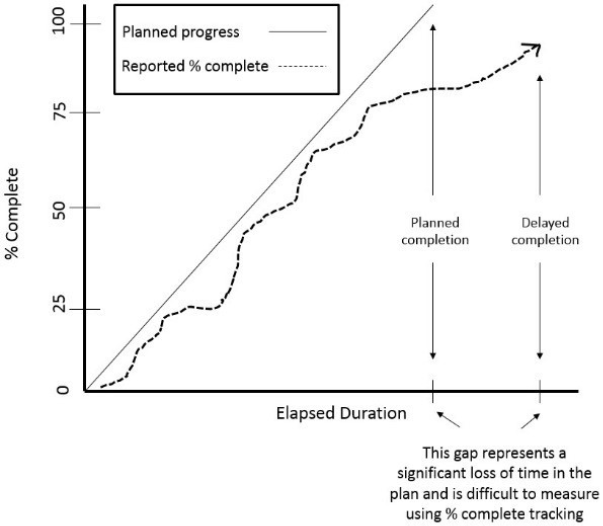
Workers often have some anxiety around organizations collecting actual hours worked, which is a common source of resistance to tracking. This leads many organizations to use % Complete instead. Unfortunately, tracking by % Complete has a major drawback: it makes measuring duration variances almost impossible, as shown in the following figure:
Tracking Project Progress in the Modern Era
Of course, it doesn’t matter what or how much you track if the data isn’t complete and accurate. The real issue, then, is how you track project progress without turning every team member into a data-entry clerk.
Every tool that removes manual steps from progress tracking makes teams more efficient and data more reliable.
Project management tools, such as Planisware and Microsoft Project, were major improvements for the last generation, as they provided a suite of features to update schedules, alert project managers of issues, and produce reports and dashboards.

Emerging technologies, especially agentic AI, provide further automations that releases progress tracking from its previous dependence on human entry at a time and the liability of errant keystrokes.
In a sense, where your project does not matter, except as a leading indicator of what the result will be. You cannot change the past, but if a project is not moving in the right direction, action must be taken to change its course.
To learn more about how our team can help with project management training and implementation, set up a free consultation.